If you want consistent organic growth, content cannot be improvised. You need structure. You need clarity. You need a framework that ties keywords, topics, publishing dates and URLs into one system.
That is exactly what this SEO Content Strategy Template provides — a powerful SEO content marketing Excel designed to help you plan pillar pages, map supporting clusters, generate optimized slugs, and monitor your content performance from a single source of truth.
This template was built for entrepreneurs, bloggers, agencies and marketing teams who want a professional, scalable way to organize their entire SEO content ecosystem. No clutter. No duplicated documents. No broken workflows. Just a clean, strategic, data-driven content plan ready to execute.
Download the SEO Content Strategy Template Here
SEO Content Strategy Template Excel Google Drive for Download
Why You Need a SEO Content Strategy Template
Most websites fail not because they lack content, but because they lack structured content. Here are the most common problems teams face:
- Publishing random articles with no connection to SEO goals
- Not knowing which content belongs to which pillar
- Losing track of planned content, drafts and published pieces
- Difficulty managing URLs, slugs and internal linking
- No system for mapping keywords to articles
- No central source for editorial planning
This Excel-based seo content strategy template solves all of those issues with a clean, intuitive structure. The template transforms your SEO strategy from a chaotic list of ideas into a highly organized roadmap that guides planning, writing, publishing and optimization.
What’s Inside the Template (Based on Your Actual Workbook)
Your Excel workbook includes three powerful tabs, each one essential for a complete SEO strategy:
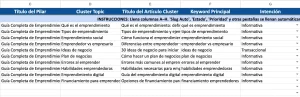
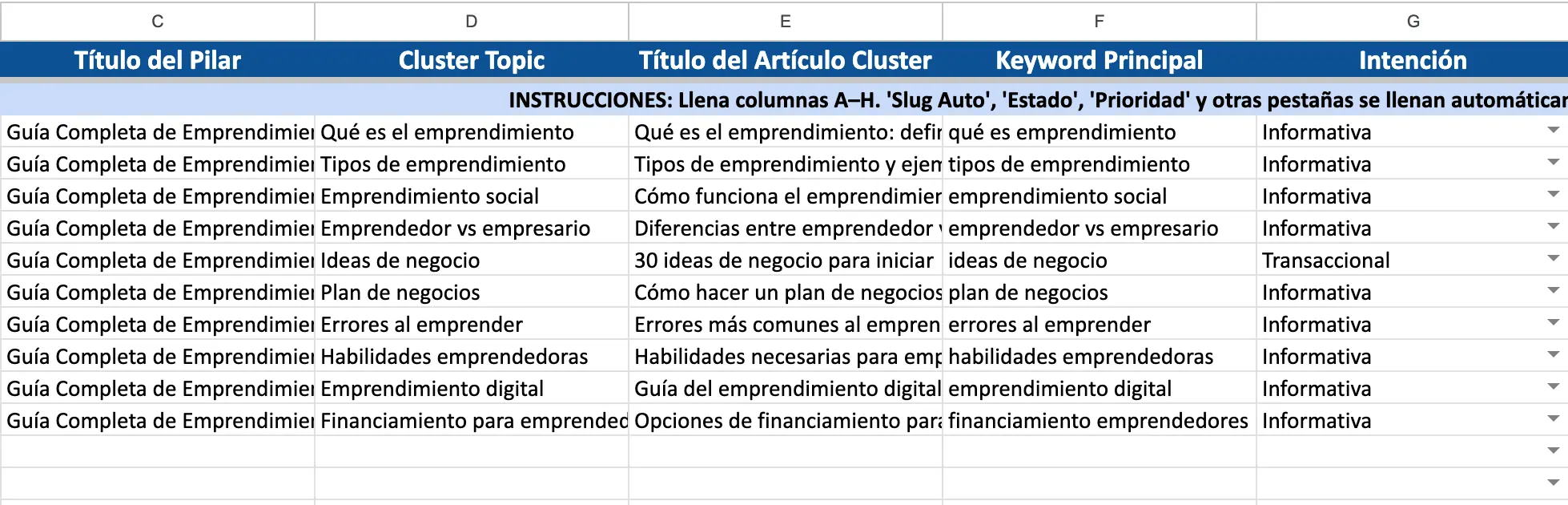
1. Pillar & Clusters PRO (Main Strategy Sheet)
This is the heart of your SEO content system.
In this sheet, you organize your entire strategy using:
✔ Pillar Pages
These represent your main evergreen topics — the foundations of your SEO authority.
Columns include:
- Pillar Page
- Pillar Title
- Pillar URL
- Search Intent
- Main Keyword
- Status
- Notes
✔ Cluster Topics
Cluster articles support each pillar, helping Google understand your topical authority.
For each cluster, the sheet includes:
- Cluster Topic
- Cluster Article Title
- Main Keyword
- Search Intent
- Auto Slug (generated later via formulas)
- Status
- Priority
- Publication Date
- Notes
This structure mirrors how modern SEO works: one strong pillar supported by multiple, interconnected cluster articles.
2. Slugs & URLs (Automation Sheet)
This tab saves you hours of manual work.
Slugs are auto-generated based on cluster article titles.
URL paths are created by combining your base URL pattern with the slug.
This ensures:
- Consistent URL formatting
- No broken slugs
- Automatic, SEO-friendly naming
- A complete visual map of your content architecture
If you’re building tens or hundreds of articles, this automation alone is a game-changer.
3. SEO Dashboard (Overview & Metrics)
Your dashboard gives you clear insights into the health of your content plan. It includes:
- Total number of cluster articles
- Breakdown of statuses (Idea, Draft, Published)
- Cluster count per pillar
- High-level performance overview
- Quick-reference table of pillars and main keywords
This helps you analyze:
- Where you’re investing most content efforts
- Which pillars need more supporting articles
- How balanced or unbalanced your content strategy is
- What topics need attention next
- What stages your content is currently in
The dashboard turns your spreadsheet into a strategic control center.
How to Use the SEO Content Strategy Template
Your template follows a professional workflow used by content strategists and SEO teams across the world. Here’s how to maximize it:
Step 1 — Define Your Pillar Pages
Open Pillar & Clusters PRO and identify your main thematic areas.
Examples could include:
- Entrepreneurship
- Personal Finance
- Marketing Tools
- Small Business Growth
Each pillar should represent a broad, evergreen topic.
Add:
- Pillar Title
- Main Keyword
- Search Intent
- URL structure
- Status
This establishes your SEO foundation.
Step 2 — Add Cluster Topics
Under each pillar, list all supporting topics. These are your cluster articles — the pieces that help Google understand your topical authority.
Add:
- Cluster Topic
- Article Title
- Main Keyword
- Search Intent
- Notes
- Priority level
- Status (Idea, Draft, Published)
Clusters should directly support and link back to their pillar page.
Step 3 — Generate SEO Slugs and URLs
Move to the Slugs & URLs tab.
Here the template automatically:
- Converts article titles into URL-friendly slugs
- Builds complete URLs using your naming structure
- Ensures consistency across your site
This alone prevents one of the most common SEO issues: inconsistent URLs.
Step 4 — Track Progress and Workflow
Use the Status column to track every article.
Recommended statuses:
- Idea
- Draft
- Editing
- Published
- Needs Update
This allows your dashboard to give meaningful insights.
Step 5 — View Strategy Insights in the Dashboard
Your SEO Dashboard updates as you build your strategy.
Here you’ll instantly see:
- How many clusters you have
- How many are finished
- Which pillar is underdeveloped
- How balanced your SEO plan is
This helps you make data-driven decisions on what to produce next.
Benefits of This SEO Content Strategy Template
✔ Eliminates strategy chaos
Everything is organized into pillars, clusters, URLs and statuses.
✔ Saves hours of manual work
Slugs, URLs and dashboard insights are autogenerated.
✔ Perfect for beginners and professionals
Whether you’re a solo blogger or part of a large marketing team, the structure scales with you.
✔ Supports true SEO growth
A clean pillar–cluster structure improves topical authority and ranking potential.
✔ Helps you write content that aligns with business goals
Every topic exists for a reason — not randomly.
✔ Keeps your content team aligned
Everyone knows what needs to be written, when, and why.
FAQ — SEO Content Strategy Template
1. Who is this SEO content marketing Excel template for?
Entrepreneurs, content creators, bloggers, agencies and SEO teams who need a structured system to scale content production.
2. What makes this template different from others?
It’s built using real SEO frameworks (pillar + cluster model), automated slugs, URL generation, and a dashboard all in one.
3. Do I need SEO experience to use it?
No. The structure is intuitive, and beginners quickly understand the workflow.
4. Can I add more pillars or clusters?
Yes — the sheet is fully expandable. Add as many topics as you want.
5. Is it compatible with Google Sheets?
Yes, you can upload it to Google Sheets and keep the structure.
6. Does this template help improve rankings?
While the template itself doesn’t rank your site, it organizes your content in a way that supports better SEO, topical authority and consistency.
7. Can teams use this collaboratively?
Absolutely. Share it via Google Sheets or a shared drive for synchronized content planning.
Final Thoughts
A well-planned SEO strategy is the difference between random posting and building a high-authority content engine.
This SEO Content Strategy Template gives you everything you need to structure pillar pages, expand topic clusters, generate URLs, plan content, and track progress — all inside one easy, professional Excel workbook.

I’m a freelance writer specializing in clear, useful, and inspiring content on health, wellness, personal finance, and entrepreneurship. I’m passionate about research, turning complex information into simple, actionable insights, and helping people make smarter decisions to improve their lives.
I write about healthy habits, nutrition, emotional well-being, money management, professional growth, and practical strategies for purpose-driven entrepreneurship.